Gravity Estimate
Coverage and the patient’s share are known before the exam.
Coverage verified before the patient arrives, without calling the payer or logging into a portal.
Trusted by more than 460 imaging centers across the US.
Before the exam
Eligibility verification and patient estimate software for imaging
Every completed exam gets paid, because coverage, authorization and estimates are settled before the exam.
Eligibility and benefits checks
Coverage is verified before the patient arrives, without calling the payer or logging into a portal.
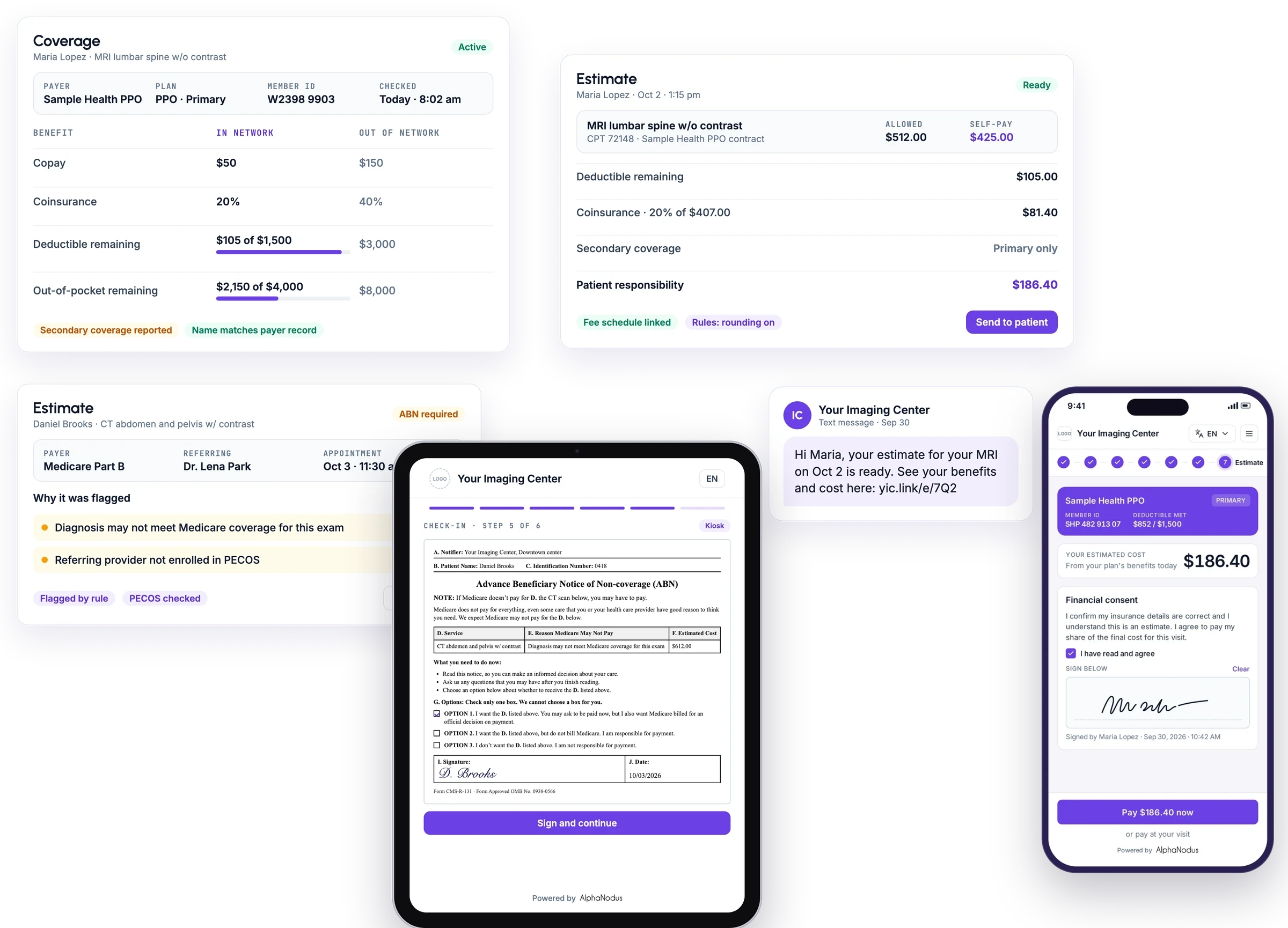
Checks coverage automatically, one order at a time or in bulk, and shows copay, coinsurance, deductible and out-of-pocket remaining by network tier.
Accurate estimates with AI benefit picks
Accurate patient responsibility in one click, even when the payer sends dozens of competing benefit lines.
Builds the patient’s estimate from the benefits response, with AI choosing the benefit line that fits each exam’s service type and network.
ABN for Medicare and PECOS enrollment check
The ABN is flagged before the visit and a referring provider not enrolled in PECOS is caught before the claim, so the signature is captured at check-in.
Flags exams that need an Advance Beneficiary Notice, from code and payer rules or by hand, and referring providers not enrolled in PECOS; the ABN appears for signature at check-in.
Estimates in Gravity Visit and by text
Patients know what they owe before they arrive, straight from a text message.
Sends the estimate to the patient’s phone as a link to a page with their benefits and estimated cost, with no login needed.
Also on the estimate
Coordination of benefits
Takes primary and secondary coverage into the estimate, or primary only, and lets exams in one visit use different insurance.
HMO and IPA plan detection
Recognizes HMO plans and shows the IPA and primary care provider, so staff know when a referral applies.
Coverage and demographic warnings
Warns when the payer reports another primary plan, supplemental or dental-only coverage, missing dates, or a name, birth date or sex mismatch.
Fee schedules and payer contracts
Contracted rates per payer, added one by one or in bulk and linked to insurance contracts so allowed amounts are priced correctly.
Self-pay rates
Shows the cash price for each exam and the self-pay total next to the insured estimate, and estimates for uninsured patients.
Configurable estimate rules
Per-practice rules for rounding, codes to skip, $0 screening exams within an interval, and financial consent wording.
Estimate history and safeguards
Keeps each estimate’s full history and warns before a change that would reset benefits or an estimate.
Estimate statuses and human review
Sends an estimate to human review when setup is missing, such as an unlinked fee schedule, and says what to fix.
Payer and EDI mappings
Maps each insurance to its electronic payer so eligibility checks run, with a tool for reviewing proposed mappings.
Manual coverage status update
Staff record a coverage status and benefits they verified themselves when the payer’s response is incomplete.
In the Flow Store
Flows that settle coverage before the exam
Each flow is one task your team did by hand, now run by Gravity. Install it from the Flow Store and it runs the same day.
Gravity does it
A flow, in its mode
The flows below: eligibility, estimates and the PECOS check run on their own.
The patient does it
Through Gravity Visit
The patient opens the estimate and pays from their phone. No mode: the patient acts, not Gravity.
Your team does it
Only the exceptions
What a flow can’t finish lands on a worklist in Gravity Work, with the history attached.
An event or a schedule starts it, and fixed rules do it. Nothing to decide, so nothing to review.
An agent reads, decides and does the work. Where a flow has a review setting, you choose: Review first. Let it finish when you’re ready.
Gravity Estimate’s flows
Financial clearance
When an order is created, coverage, eligibility and authorization gaps are flagged before the exam, for a person to resolve.
AgenticStartsWhen an order is created
Exceptions go toOrders worklist
Portal eligibility checks
Checks eligibility on a payer portal through the browser extension, one at a time or in bulk, for payers without electronic eligibility.
AgenticStartsWhen your team runs it, one order or in bulk
Exceptions go toOrders worklist
Eligibility checks on a schedule
Eligibility runs on its own on a schedule for orders waiting to start, so coverage is known before anyone has to ask.
AutomatedStartsOn a schedule, for orders waiting to start
Exceptions go toOrders worklist
Patient estimates on their own
Once coverage is known, the estimate is created and sent to the patient’s phone on its own, with no one building it.
AutomatedStartsWhen coverage is known
Exceptions go toOrders worklist
PECOS check on Medicare orders
Checks the referring provider on every Medicare order against federal enrollment data on its own, and tags those not enrolled so the estimate is flagged for an ABN before the claim is denied.
AutomatedStartsOn a schedule, on Medicare orders
Exceptions go toOrders worklist
Secondary insurance finder
Finds a secondary insurance the patient has that isn’t attached to the order, on its own.
AutomatedStartsOn the order, on its own
Exceptions go toOrders worklist
Works with
From the new order to the payment
The engine
Gravity Flow runs Estimate’s flows: eligibility on a schedule, financial clearance, patient estimates, the PECOS check, the secondary insurance finder and the portal checks.
Gravity FlowCoverage and authorization are fixed before the exam, not discovered after the claim.
Questions
Questions about eligibility verification and patient estimates
What is Gravity Estimate?
Gravity Estimate knows the patient’s coverage and their share before the exam. Eligibility and benefits are checked on their own, electronically or on the payer’s portal; AI picks the right benefit line so the estimate is accurate in one click; and the estimate reaches the patient’s phone before they arrive.
What happens to my team?
Gravity takes over the tasks, not the people. The routine work completes on its own, so your team can give patients the attention the paperwork used to take.
Can Gravity check eligibility for payers without electronic eligibility?
Yes. For those payers, Gravity checks eligibility on the payer’s portal through the browser extension, one order at a time or in bulk. Eligibility checks on payer portals, for payers without electronic eligibility, are a professional-services offering.
Does Gravity handle the ABN for Medicare patients?
Yes. Exams that need an Advance Beneficiary Notice are flagged from code and payer rules or by hand, and the referring provider on every Medicare order is checked against federal enrollment data, so one not enrolled in PECOS is caught before the claim. The ABN appears for signature at check-in.
What about patients with two insurances, or none?
Coordination of benefits takes primary and secondary coverage into the estimate, or primary only, and exams in one visit can use different insurance. Gravity also finds a secondary insurance that isn’t attached to the order, on its own. For uninsured patients, it estimates from your self-pay rates.
How is our data protected?
Hosted on AWS in US regions only. A HIPAA Business Associate Agreement with every customer. Every sub-processor used in Gravity has a BAA with Alpha Nodus. Independently penetration-tested every year. Data encrypted at rest with per-tenant keys. MFA on every production login, SSO on Enterprise. Controls monitored continuously, with a public Trust Center.
Trust Center