Gravity Booking
The exam is booked in the right slot, on the right device, the first time, and schedules stay full.
Every order becomes an exam. Every open slot gets a patient.
Downtown Radiology on Gravity Booking
- 43.8%of Downtown Radiology's bookings were made by patients in September 2026, up from 19.7% in the first month, for the exams opened to patient booking
- 83.5%of patients who booked themselves did so within a day of the order arriving; half within 1.8 hours
- 94.2%of the exams patients booked themselves were completed
Start with the exam you book most often and let patients book it from a text. Ninety-four percent of the exams our patients booked themselves were completed. Patients are ready to do this.
How Downtown Radiology went from 19.7% to 43.8% of bookings made by patients, from a text, in twelve months. Read the Downtown Radiology story
Trusted by more than 460 imaging centers across the US.
Booked right
Radiology patient booking for imaging centers
Booked right the first time, with every rule checked.
Booking rules
Every device, exam length, patient limit and gap checked on every booking, on a schedule built around each device, so the exam is booked right the first time.
Every booking is checked against the device, exam length, patient limits, gaps, alerts, repeat-exam and double-booking rules, on each device’s schedule template, so only valid slots are offered.
Authorization-aware booking
Slots too early for the authorization are greyed out, so no patient is booked before the payer is ready.
Per-insurance lead times grey out slots too early for authorization, waive once authorized, and flag moves outside the authorized window.
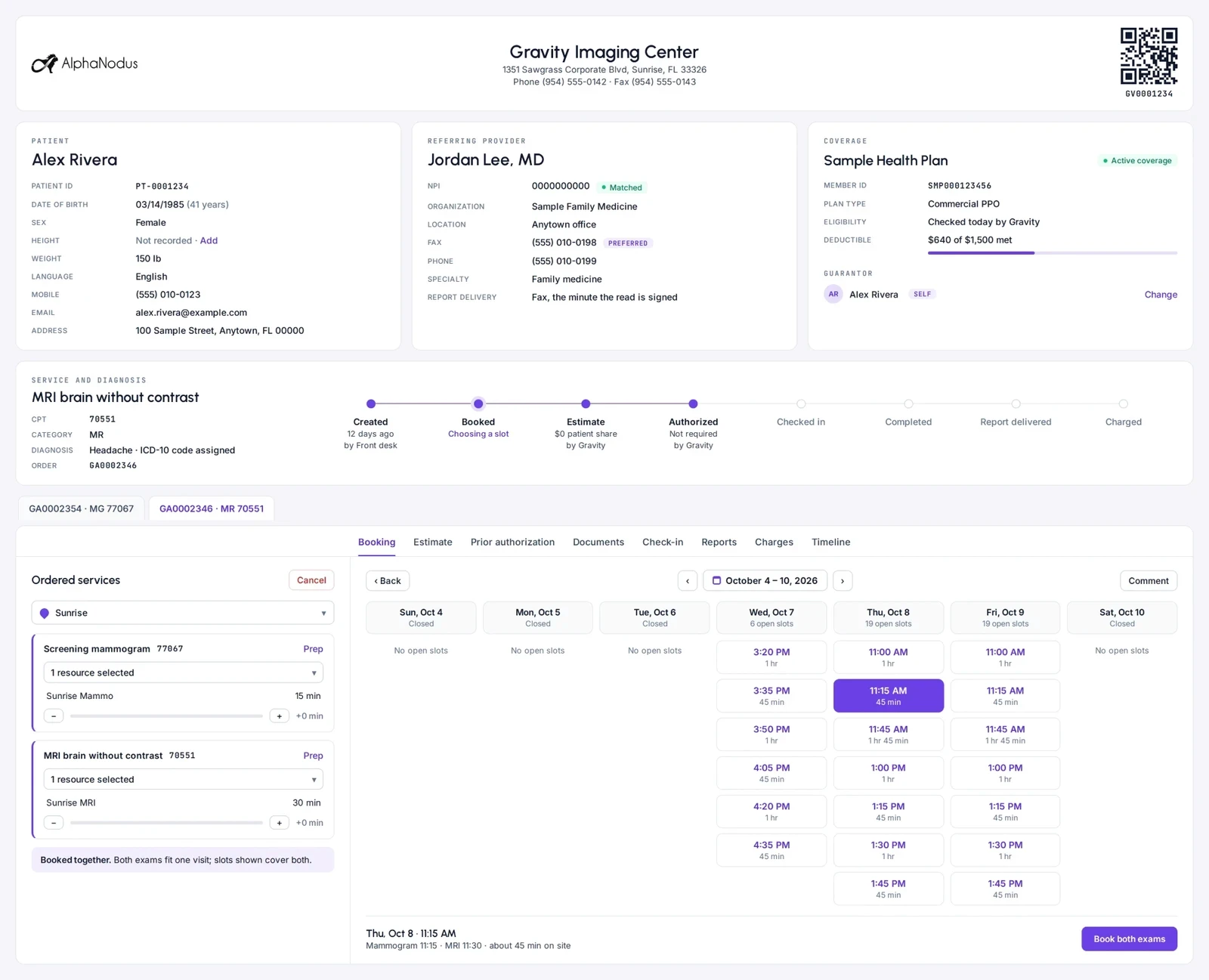
Multi-exam visits in one booking
A mammogram, ultrasound and MRI booked as one visit in the right order, in one step.
Several exams on one visit, multi-modality included, are booked together in the right sequence with minimum and maximum gaps, and move together when one is moved.
Screening questions, answered once
Safety, contrast and women’s screening questions, answered once and kept on the patient, so nobody is booked in the wrong spot and nothing is on paper.
The answers steer which slots are offered, and staff can still book after review.
Also built in
Staff booking
Booking staff book every exam on an order in one pass, picking location, device and slot, with slots shown only where the exam can be done.
Schedule templates
Each device gets a weekly template of open, closed and restricted blocks that defines when and what can be booked; closures, downtime and reserved blocks adjust it without rebuilding it.
Reserved blocks that release
Time can be held for certain exams, priorities, providers or referring groups and released to anyone as the date nears if still empty.
Service groups
Exams always ordered together are saved once as a group, so staff add the whole bundle with its sequence and timing in one pick.
Repeat-exam guard
The same screening exam cannot be rebooked too soon after a completed visit, with an override for legitimate exceptions.
Patient double-booking check
Slots that clash with the patient’s other appointments are not offered.
Force book
Walk-ins, urgent orders and very large visits can be placed outside normal availability, with the override recorded.
Availability from your RIS
Open slots can come from the center’s existing RIS schedule instead of templates kept in the system.
In the Flow Store
Flows that fill every open slot
Each flow is one task your team did by hand, now run by Gravity. Install it from the Flow Store and it runs the same day.
Gravity does it
A flow, in its mode
The flows below: booking outreach, reminders, earlier-slot nudges and no-show outreach go out on their own.
The patient does it
Through Gravity Visit
The patient books from their phone, under the same rules. No mode: the patient acts, not Gravity.
Your team does it
Only the exceptions
What a flow can’t finish lands on a worklist in Gravity Work, with the history attached.
An event or a schedule starts it, and fixed rules do it. Nothing to decide, so nothing to review.
An agent reads, decides and does the work. Where a flow has a review setting, you choose: Review first. Let it finish when you’re ready.
Gravity Booking’s flows
Booking outreach
Once the order exists, the patient is texted or called to book, with a secure link straight to open slots, so the patient gets on the calendar.
AgenticStartsOnce the order exists
Exceptions go toReal-time worklist
Confirmations and reminders
Patients get booking confirmations and appointment reminders by text or call, sent on a schedule, so the booked slot is kept and the patient arrives prepared.
AutomatedStartsOn a schedule before the visit
Exceptions go toOrders worklist
Earlier-slot nudges
When an earlier opening appears on a device, eligible booked patients are offered it and moved when they accept.
AutomatedStartsWhen an earlier opening appears on a device
Exceptions go toOrders worklist
No-show marking
Missed appointments are marked no-show each day on their own, or by staff, and land in a worklist for rebooking.
AutomatedStartsEvery day
Exceptions go toOrders worklist
No-show outreach
Patients who missed an appointment are reached by text or call to rebook, so the slot is refilled and the exam still happens.
AutomatedStartsAfter the daily no-show marking
Exceptions go toOrders worklist
Also in the Flow Store, for this job
- Gravity Visit
Self-booking by voice: AI voice agent
An AI voice agent calls patients to book new appointments, confirm and move them, reads prep instructions, asks screening questions and logs every call.
AgenticStartsWhen a patient calls, or a booking needs a call
Exceptions go toReal-time worklist
Works with
One set of rules, whoever books
Patients who book themselves
Patients book themselves under Booking’s rules, and the AI voice agent books by phone under the same rules.
Gravity VisitAuthorization status
Authorization status and lead times decide which slots are offered.
Gravity PriorAuthThe flows
Gravity Flow runs Booking’s flows: booking outreach, confirmations and reminders, earlier-slot nudges, no-show marking and no-show outreach.
Gravity FlowFill every open slot from the orders you already have.
Questions
Questions about radiology patient booking
What is Gravity Booking?
Gravity Booking puts every exam in the right slot, on the right device, the first time, whoever makes the booking. Every device, exam length, patient limit, gap between exams and authorization lead time is checked on every booking, and multi-exam, multi-modality visits are booked in one pass on schedules built around each device.
What happens to my team?
Gravity takes over the tasks, not the people. The routine work completes on its own, so your team can give patients the attention the paperwork used to take.
Can we stop patients being booked before the authorization is back?
Yes. Each insurance can carry a lead time, and slots too early for the authorization are greyed out, whoever books. The lead time is waived once the visit is authorized, and moves outside the authorized window are flagged.
How do screening questions work?
Safety, contrast and women’s screening questions are answered once and kept on the patient. The answers steer which slots are offered, so nobody is booked in the wrong spot and nothing is on paper, and staff can still book after review.
Do we have to rebuild our schedules in Gravity?
No. Open slots can come from the center’s existing RIS schedule. Or each device gets a weekly template of open, closed and restricted blocks in Gravity, and closures, downtime and reserved blocks adjust it without rebuilding it.
How is our data protected?
Hosted on AWS in US regions only. A HIPAA Business Associate Agreement with every customer. Every sub-processor used in Gravity has a BAA with Alpha Nodus. Independently penetration-tested every year. Data encrypted at rest with per-tenant keys. MFA on every production login, SSO on Enterprise. Controls monitored continuously, with a public Trust Center.
Trust Center